The fun, safe way to run your board election.
Members vote from any phone or computer with a private PIN. You get clear results and a full record of every step. No software to install.
No card required. Paid plans from $99, ready within 1 business day.

Made for groups that vote
If your group elects officers, approves bylaws, or votes on budgets, BallotKeep was built for you.
Beautiful for voters. Effortless for you.
Every ballot carries your logo and colors, works on any phone, and needs no app or account. Behind it, BallotKeep handles the busywork.
A ballot that looks like it came from you
Add your logo, colors and a background image. Candidates get photos and short bios. Voters see your organization front and center, on any phone or computer.
- Your logo, colors and background
- Candidate photos and bios
- Yes / No / Abstain questions on the same ballot
- Big, clear buttons that work for every member


President, directors and treasurer. One ballot, one sign-in.
Put every office on the same ballot, each with its own candidates and its own rules: rank the president, pick three directors, elect a treasurer. Members vote in each office or abstain on any of them, and see a short summary of their choices before they submit.
- Each office has its own method and number of seats
- Abstain on one office, vote in the rest
- “Your choices” review before submitting
- Results and the certified report, office by office


Pick, rank, or approve. Whatever your bylaws say.
Choose how members vote with one click, office by office, and see exactly what voters will see. Most groups never change a thing, and the simple ballot stays simple.

Opens, reminds, and closes on schedule
Pick the dates once. Voting opens and closes on time, and members who haven't voted get a friendly reminder before the deadline. Watch turnout climb toward quorum in real time.
- Automatic open and close, in your time zone
- Reminders only to members who haven't voted
- Live turnout and quorum meter

Your secretary gets the official report. Automatically.
The moment voting closes, a certified results report (PDF) is emailed to your secretary and anyone else you list: turnout, quorum, the winners of every office, every round of a ranked-choice count, and a fingerprint of the election's audit log. Nothing to compile, nothing to forward.

Weighted votes and proxies, without the confusion
Votes can count by units or shares, and members who can't vote can name a proxy. You approve each request, or enter paper proxy forms yourself. The proxy sees a separate, clearly labeled ballot for each member they represent.
- Votes weighted by units or shares
- Online and paper proxies, approved by you
- Hidden until you switch them on

Vote on motions live, right in the meeting
Members check in once on their phone with their usual PIN. Each motion you open appears on every screen at once: tap Yes, No or Abstain, then Confirm. It works in the room, on Zoom, or both.
- One sign-in for the whole meeting
- Majority or two-thirds, secret ballot or roll call
- Optional timer for quick votes
- Weighted votes, proxies and quorum work here too

See who has voted, then show the result to the room
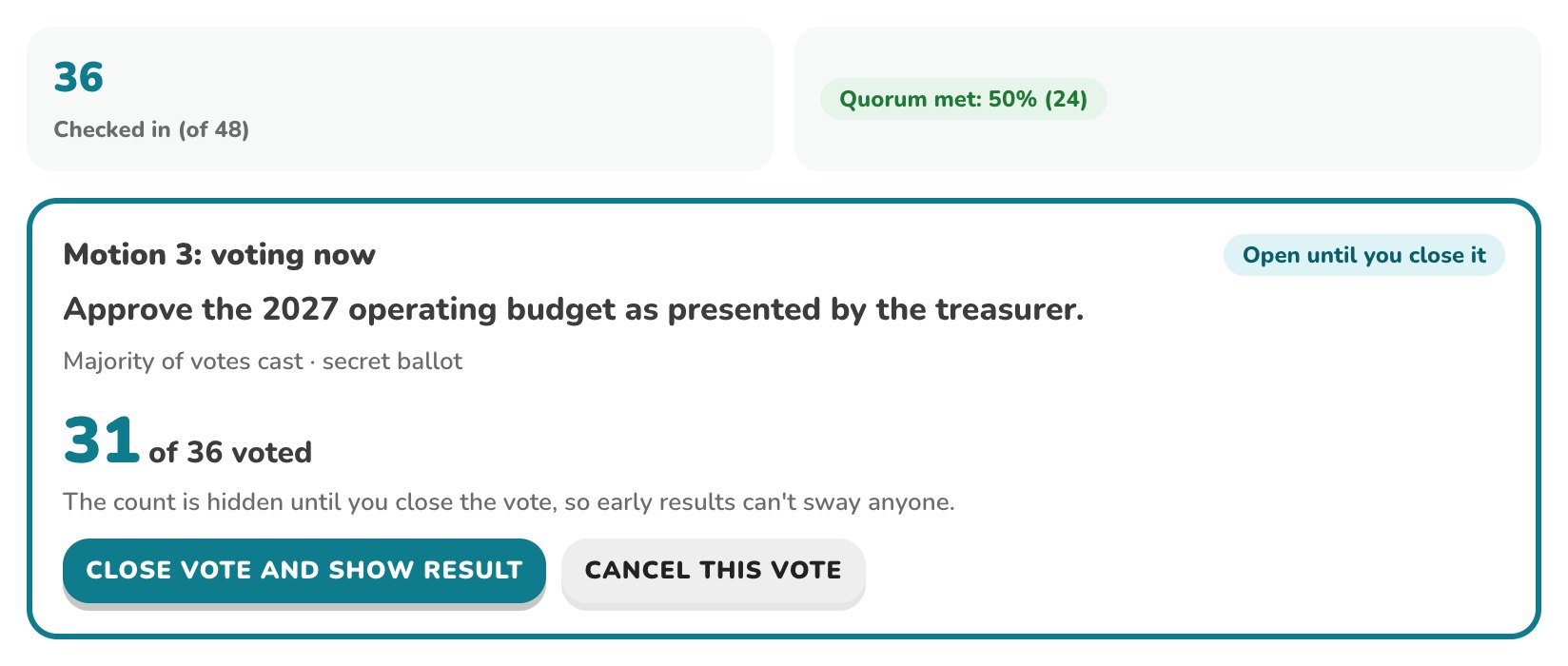
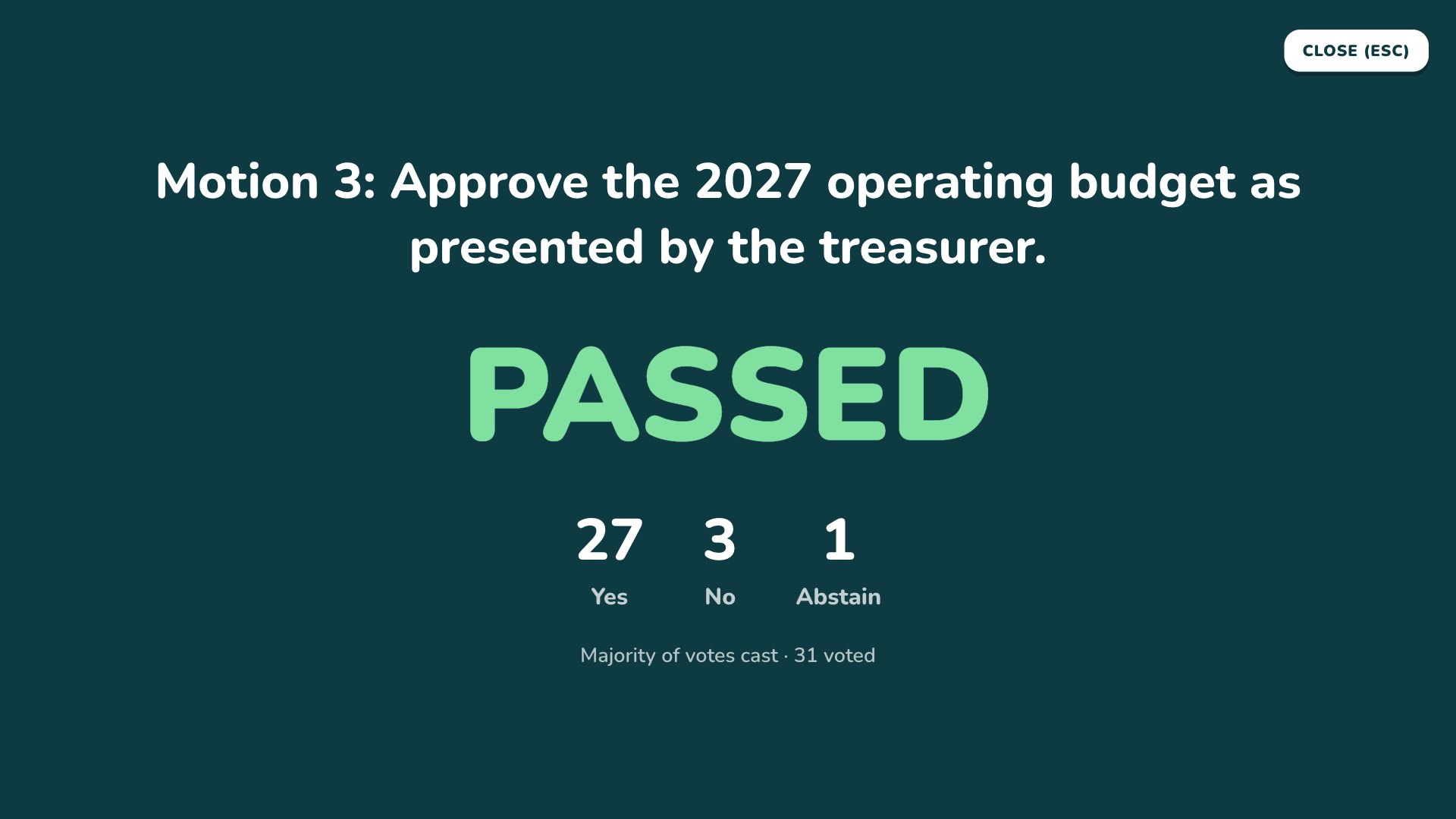
You see "31 of 36 voted" as votes come in, but not the count, so early results can't sway anyone. Close the vote and the result fills the screen for the projector or a Zoom screen share.
- Live turnout, hidden tally
- Full-screen result for everyone to see
- A minutes-ready PDF of every motion
Collect nominations before you build the ballot
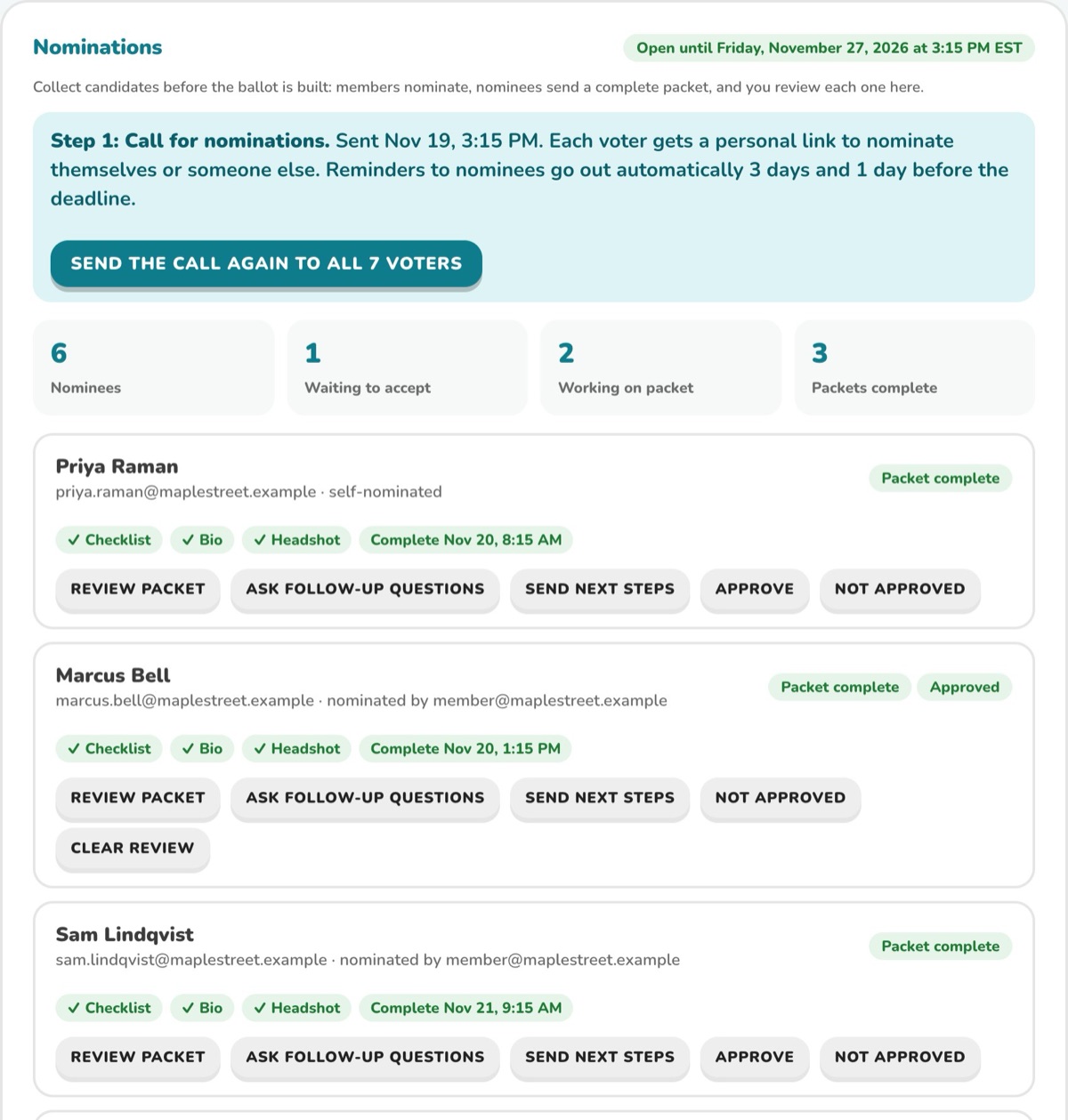
Each member gets a personal link to nominate themselves or someone else. Nominees accept and send a complete packet, and you review every one in one place.
- Self-nominations and nominations of others
- Checklist, bio, headshot or resume: you choose
- Uploads checked for sensitive personal information
- Reminders to nominees before the deadline
Every member votes in their own language
Ballots, meeting votes and voter emails come in English, Spanish, Chinese, Arabic, French, Vietnamese and Polish. You pick your election's language, and each member can switch with one tap.
- Your election's language is the default
- Members can switch at any time
- Voter emails in the same language

Screenshots use made-up organizations and sample data.
Why groups choose BallotKeep
Everything a board, association or union needs to vote, from the first nomination to the minutes.
One tool, start to finish
Nominations, the ballot, live meeting votes and the certified report, all in one place, with one voter list.
Fits your bylaws
Pick, rank or approve. Weighted votes, proxies, quorum, majority or two-thirds, secret ballot or roll call.
Every member included
Seven languages, big clear buttons, and nothing to install. Members vote on any phone or computer.
Proof you can show members
A certified results report, a minutes-ready record of every motion, and a tamper-evident audit log.
Security is our day job
Built by a cybersecurity firm: secret ballots, multi-factor admin sign-in, and every vote counted exactly once.
Simple, fair pricing
Pay per election with no monthly fee, or go unlimited for the year. Try it free first.
Four easy steps
From checkout to results, with nothing to install.
Start free or pick a plan
Try free with up to 5 voters, no card required. Or pay online by card.
Get your election
Within 1 business day we email your admin a secure sign-in link to your private election.
Add offices & voters
Add each office and its candidates, your branding and dates, then email every voter their PIN in one click.
Get certified results
Voting closes on schedule and your secretary gets the certified report automatically.
Serious about security
A disputed election costs far more than the software. BallotKeep lets you show members exactly how the vote was run.
Your election stands alone
Each election is walled off from every other, with its own named admins.
Secret ballots
Voters use a one-time PIN. Who voted is tracked; how they voted is not tied to them.
Every vote counted once
Each ballot is saved in a single step, so votes can't be lost or double counted.
Audit trail
Every admin action is logged with who did it and when.
Locked-down admin
Admin pages sit behind multi-factor sign-in, with attack protection built in.
Records you keep
Download results, turnout, and anonymous ballots in one click. We hold full records for 90 days after the vote closes.

BallotKeep is built and run by Castle-Knight LLC, a Massachusetts cybersecurity firm led by a CISM, CRISC, and GISP-certified security executive.
Simple pricing
Pay per election. No monthly fee.
Try free with up to 5 voters — no card required.
- 1 practice election, up to 5 voters
- Results shown on screen
- Business email required
- Shows a "Powered by BallotKeep" mark
Ready to run the real thing? Pick a plan below.
- One election, up to 250 voters
- Open for 60 days
- One-click voter emails with PINs
- Ranked choice, reminders & quorum
- Certified results report
- Email support
- Unlimited elections for 12 months
- One-click voter emails with PINs
- Every feature, including weighted votes & proxies
- Certified report for every election
- Priority support
- Renews yearly, cancel any time
- We load your voter list
- We add your logo and colors
- We set up your races and admins
- You just send the invite
Discounts for nonprofits, veteran-owned businesses, and partner groups
Apply for a discount. We review each application and email you a personal code.
30% off for our first customers
Use EARLYADOPTER30. First 25 orders only, through January 8, 2027. One code per order.
Add-on: text-message PINs*
Send each voter's PIN by text as well as email. $29 per election, up to 1,500 text messages. With Annual unlimited, $99 a year covers every election on your plan, up to 5,000 text messages a year. Add it from your admin console any time, or email us and we'll turn it on the same day.
*One text message is up to 160 characters; a longer one, or one in some languages, counts as 2 or 3. If an allowance runs out, texts stop and PINs still go by email. US and Canadian mobile numbers only. Members can reply STOP at any time.
Questions? We've got answers.
Can we try BallotKeep first?
Yes. Try free with up to 5 voters — no card required. You get one practice election so your board can see how it works. Sign up here.
What do we get with the free sandbox?
One practice election, up to 5 voters, with results shown on screen. A business email is required, and ballots show a "Powered by BallotKeep" mark. For a real election with more voters, pick a paid plan.
How fast can we start?
Your election is usually set up and emailed to you within minutes of purchase, and always within 1 business day. With managed setup, plan on 2 business days.
Do voters need an account?
No. Each voter gets an email with the voting link and their own one-time PIN. They open the link on any phone or computer, enter their email and PIN, and vote.
How do voters get their PIN?
Send voters their PIN and voting instructions with one click: first a save-the-date announcement with the voting dates, then a how-to-vote email with their personal PIN. Emails come from BallotKeep under your organization's name, and replies go to your election contact. Voters who already voted are never sent a new PIN. Included in all paid plans. Prefer your own mail merge? You can download the PIN list instead.
Can voters get their PIN by text message?
Yes, with the text-message add-on: $29 per election (up to 1,500 text messages), or $99 a year with Annual unlimited (up to 5,000 a year, shared by all your elections). Add members' US or Canadian mobile numbers to your voter list and confirm they agreed to get texts. When you send the how-to-vote email, each of them also gets the same PIN and voting link by text, and they can sign in with their phone number or their email. If the allowance runs out, PINs still go by email. Members can reply STOP at any time. Need it on short notice? Email us and we'll turn it on the same day.
Can we use ranked choice voting?
Yes. Choose "Pick candidates" (the usual ballot), "Ranked choice" or "Approve any" for each election. With ranked choice, voters simply tap candidates in order, and the results show every round of the count.
Can we elect several offices on one ballot?
Yes. Add as many offices as you need, up to 20 (for example President, Board of Directors and Treasurer) and give each one its own candidates and number of seats. Members sign in once, vote in every office on one page, and see a summary of their choices before they submit. Results and the certified report show each office separately.
Can each office use a different voting method?
Yes. For example, rank the candidates for President, pick up to three Directors, and use approval voting for a committee. Each office counts on its own.
Can a member skip one office?
Yes. Every office has its own Abstain box, so a member can vote for President and abstain on Treasurer. BallotKeep asks them to vote or tick Abstain in each office, so no office is skipped by accident, and their ballot still counts toward quorum.
Can we change the ballot after voting starts?
You can fix the spelling of an office's name, and a candidate's bio or photo, at any time. Once anyone has voted, you can't add, remove or rename candidates, add or remove offices, change how many seats an office has, or move candidates between offices. That way every ballot is counted against the ballot the member actually saw. Use Preview Ballot to check everything before you open voting.
Can anyone change or erase the results?
No. Once voting has closed, the ballots are the official record: nobody, including your own admins, can reset them, even if voting is reopened. An election can't be deleted while voting is open, and every admin action, including a deletion, is recorded. Practice votes can be cleared before you first close voting, while the election is in test mode.
Is there a guide for admins and voters?
Yes. The admin guide walks you through setup step by step, with pictures, and the one-page voter guide is written so you can link it in your emails to members.
Do you support weighted votes and proxies?
Yes, for HOAs, condo associations, co-ops and unions. Votes can count by units or shares, and members can name a proxy that you approve (or you can enter paper proxy forms). Both stay hidden until you turn them on, so other elections stay simple.
What is the certified results report?
A PDF with turnout, quorum, the full results and a fingerprint of the election's audit log. It's emailed automatically to your secretary (and anyone else you list) the moment voting closes. You can also download it any time.
Can voting open and close on its own?
Yes. Set the dates and time zone once and BallotKeep opens and closes voting on schedule. You can add reminder emails before the deadline; they go only to members who haven't voted yet.
What if we have more than 250 voters?
Email us before you buy and we'll quote a plan that fits.
Can we vote on motions during a live meeting?
Yes. Turn on Meeting votes and share the link or QR code. Members sign in once on their phone with their email and PIN, and every motion you open appears on their screen. They vote Yes, No or Abstain. You choose majority or two-thirds of the votes cast, secret ballot or roll call, and an optional timer. Close the vote to show the result full screen, then download a PDF of every motion for your minutes. It works in person, on Zoom, or both, and it's included in every plan.
Can members nominate candidates?
Yes. Turn on Nominations and send the call with one click. Each member gets a personal link to nominate themselves or someone else. Nominees accept and send the packet you ask for (a checklist, bio, headshot or resume), and uploads are checked for sensitive personal information. You review, approve or ask follow-up questions in the admin console, and nominees get reminders before the deadline.
What languages can voters use?
English, Spanish, Chinese (Simplified), Arabic, French, Vietnamese and Polish. You set your election's language, which is used for the ballot and the voter emails, and each member can switch the page to another language. Candidate names, bios, office names and motions appear exactly as you type them.
Can we see who voted?
You can see who has voted so you can send reminders. You cannot see how any person voted.
Can government-related groups use BallotKeep?
Yes, if your group is a private member organization, such as a public employee union or association, or an electric, water, or other utility co-op. BallotKeep is not for official public elections (public office or ballot questions), or for votes by a town board, council, or commission, which the law usually requires to be public.
How long do you keep our election records?
We keep full records (voter list, ballots, and results) for 90 days after voting closes. Then we archive the election: the voter list and ballots are deleted, and only a results summary is kept. One year after voting closes, everything is deleted. Your admin pages show a countdown so you know when.
Who keeps the official election records?
You do. Your organization is responsible for keeping its official election records under its bylaws and any laws that apply. When voting closes, download your results, voter turnout list, and anonymous ballots from your Results & Records page and save them in your own files. BallotKeep is not your record-keeper.
Can we get a refund?
If we can't deliver your election, you get a full refund. See our Terms for details.